If you are using a screen reader and are having problems using this website, please call (888) 226-0076 for assistance. Please note, this number is for accessibility issues and is not a ticketing hotline.
APR 10-12 & 17-19, 2026
1    Download the App 2    Register Wristband 3    Know Before You Go 4    Camping 5    Once You’re Here

Your Simplified Guide to Coachella

Read up below and share this guide with everyone in your group so you all have the need-to-know details ahead of the weekend you’re attending. Return to this page for updates and additional helpful information in the coming weeks. Campers, find specific info about arrival and more below.

Download The App

Coachella App Icon

COACHELLA FESTIVAL APP

Download & Install the Coachella Mobile App for your iOS and Android devices to get the latest updates directly from Coachella, register your wristband, find an interactive venue map, plan your custom schedule and more.

Apple Store Icon Google Play Icon

Register Your Wristband

Register Your Wristband Via Festival Mobile App

Registering your wristband secures your investment and helps with a smooth entrance at the festival. Complete wristband registration before applying it onto your wrist, and before arriving on site. Register your wristband in the Coachella Festival mobile app.

  • Your unique 6 digit alphanumeric code is on the underside of the RFID badge.
  • Each person attending registers the wristband they will be wearing.
  • Need Help? Contact AXS order support https://support.axs.com/

Note: Wristband registration is required.

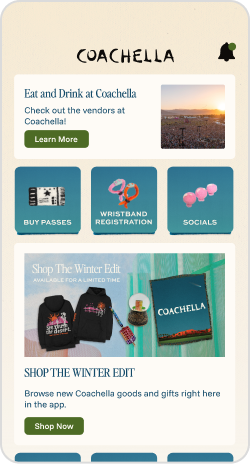
Festival App Home

Step 1: Click on the Register Wristband Tile

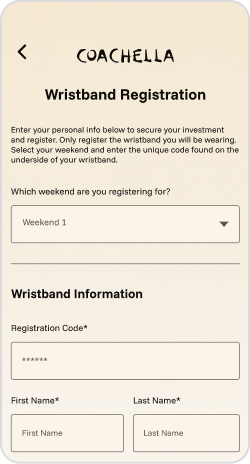
Festival App Register Page

Step 2: Fill Out Your Information

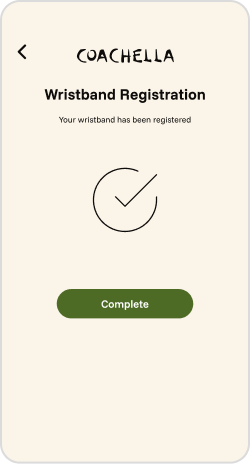
Festival App Register Completion

Step 3: Complete Registration

For more detailed information, please visit the Mobile Page.

Know Before You Go

FESTIVAL CHECKLIST:

  • Download the Coachella Mobile App
  • Register your wristband on the App
  • Review items you can and can’t bring into the festival
  • Review camping rules, hours and more helpful information
  • Review your designated entrance based on your camping type OR transportation method

Plan Your Arrival

General parking opens Friday-Sunday at 11am.
Venue opens Friday-Sunday at 1pm-ish.*

Shuttles

The BEST choice for transportation. Hop on board for a safe, comfortable and environmentally-conscious alternative all weekend long. $150 (service fees incl)

Carpoolchella

Fill your car with 4 or more friends and decorate it for CARPOOLCHELLA®. Get creative, get spotted for a chance to win a prize.

Getting Here - Parking, Rideshare & more

Whether planning to park, walking/biking or grabbing a rideshare - make sure you’ve got the details covered.

What To Bring, What To Leave Behind

Take a second to review it all, so you don’t have to forfeit your items when you arrive. (Campers: check the rules and allowed items here).

Accessibility & ADA

If you need assistance finding your most accessible route around the event, please visit us at an Accessibility Services Hub. View our dedicated Accessibility / ADA Access Guide and Access Maps here.

Hotel Packages

Need a last minute place to stay? Check out our travel packages and accommodation options around the festival.

You may have a few more questions. This is a great place to visit for more support & FAQs.

Camping

Camping Arrival Hours of Operation

Check-in outside of these scheduled times is prohibited. Please plan your travel accordingly. Campers must be 18+ over unless with a parent/legal guardian.

  • Camping is open Thu 9am–Mon 9am. Four nights stay!
  • Car/Tent check-in Thu 9am–2am; Fri & Sat 9am–8pm, Sun 9am–3pm.
  • Pedestrian check-in is open 24hrs.
    • This is for joining your friends who already have a campsite or visiting friends that have a campsite.
    • This is not for checking into a site you bought.
  • Campground check-out is 9am Monday morning.

There will be no early access. No camping vehicle ins/outs. No exit during lockdown hours Fri - Sun 9pm-2am.

Note: Arrive together to camp together. Powered, Preferred and Preferred Front Row Car Camping -cars wishing to camp in sites next to each other (with the same type of camp spot) must arrive at the same time. Meet up prior to driving into camping at the same time. If you’ve purchased Group Car Camping you may arrive separate, camp together. No waiting for your group to arrive before setting up your camp.

Additional Campground Rules, Info & FAQs

Good to know facts, Camping prohibited items and more can be reviewed here plus find helpful Camping FAQs. For the safety and comfort of all Coachella attendees, ALL VEHICLES ARE SUBJECT TO SEARCH UPON ENTRY TO THE CAMPGROUNDS. Please review the prohibited items list closely and understand that all items are subject to search. Just a reminder, everyone needs a festival pass to enter camping.

Camping Decal Application

Access to the Campgrounds and Overnight Parking requires an RFID-enabled windshield decal. Please apply your decal to the interior of the windshield on the lower-left driver’s side when you arrive at Camping Check-In. DO NOT APPLY TO THE OUTSIDE OF YOUR WINDSHIELD.

ARRIVAL CHECKLIST:

  • All members of your group must have festival passes.
  • Decal affixed to driver side windshield.
  • Cars subject to search.
  • Camping staff will direct you to your spot. (you must camp where assigned.)
Based on your camping type, please review the following section to help facilitate your best camping experience.

You can also reference the explicit details sent in your Camping KBYG email.

Car Camping, Preferred Car Camping, Front Row Car Camping, and Powered Car Camping

Group Camping

Ready-Set Camping

La Campana

Lake Eldorado

For more detailed information, please visit the Camping Page.

Once You’re Here

Find the Festival Maps On The App

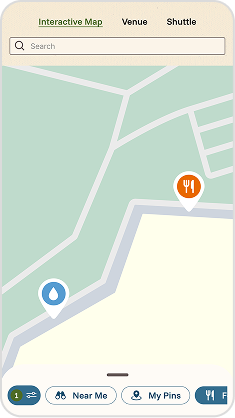
View the Venue, Camping, Camping Hub, Parking, and Directions maps on the app for the best viewing experience. Familiarize yourself so you know how to quickly get from stage to stage and find nearby points of interest (food, bathrooms etc) using the interactive map.

Festival App Map

View all festival maps

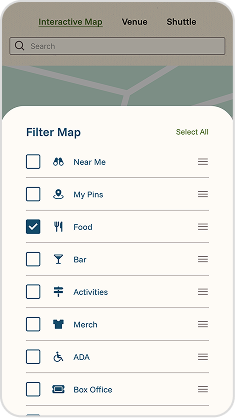
Festival App Map Filters

Filter through the options

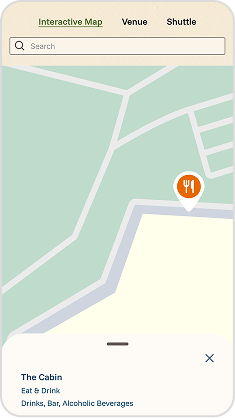
Festival App Vendors

Find individual vendors

Activities & Amenities

Good times beyond the stages - both in the venue & in the campgrounds.

Eat & Drink

Our food and beverage program showcases top restaurants and bars from across the country, featuring a wide range of cuisine and refreshment options to satisfy every festival-goer. Enjoy everything from chef-driven dishes and crave-worthy street food to artisanal ice cream, specialty cocktails, spirit-free libations, craft beers, and a variety of refreshing beverages.

Art

Coachella’s curators scour the globe for artists, architects, and designers to transform the Empire Polo Field. Newly-commissioned, large scale art installations and returning favorites offer fans art as landmark, public space, and icon—to be viewed from perspectives as diverse and dynamic as Coachella’s lineup of performers.

Merchandise

Avoid the line and order your merchandise on the app for shipping direct to your door. Amex® Card Members, shop the Coachella Amex Shop for exclusive items & free standard shipping on all orders. While merchandise supply lasts. Terms Apply.

Lost & Found

Lose something on the field? Learn how to protect your stuff ahead of arriving and where to view found items in real time.

DID YOU REMEMBER TO:

  • Download the Coachella Festival mobile app
  • Register your wristband
  • Review items you can and cannot bring into the festival
  • Review campground rules, hours & more info
  • Review your designated entrance based on your camping type OR transportation method
Coachella Livestream App
Watch the livestream

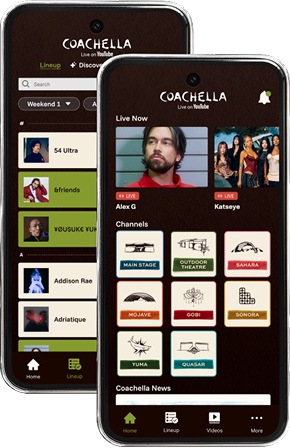
Whether you're heading to Weekend 1 and want to relive it all over again Weekend 2, or gearing up for Weekend 2 and looking for a preview of what’s to come, the Coachella Livestream has you covered both weekends; only on YouTube. Explore every stage, catch the biggest moments, and download the livestream app to build your perfect viewing schedule.

Apple Store Icon Google Play Icon
Learn More